How I Safely Delegated an AWS Migration to an AI Agent
Recently, on one of my projects, I had to migrate an entire app’s cloud infrastructure from one AWS account to another. Thankfully, the infrastructure is managed by Terraform. Since Terraform’s interface is a CLI, I quickly realized that I could let my coding agent use that CLI. Here is the system I built to make that work safely.
Why Terraform makes AI delegation possible
Familiar with Terraform? Skip to the next section.
Terraform is a tool that lets you manage your cloud resources via code. It belongs to the “Infrastructure as Code” (IaC) family of tools. Without such tools, you’d need to manually configure each cloud resource (databases, storage, load balancers, etc.). While this might work for very small projects, as soon as your infrastructure grows - either in the number of resources or the number of environments (dev, staging, prod) - managing them manually becomes error-prone and leads to a mess that nobody wants to touch.
The simplest Terraform workflow consists of configuring a cloud resource using Terraform’s proprietary language, HCL, and then “translating” these definitions into cloud provider API requests. This results in creating, updating, or destroying specific resources. As mentioned, the Terraform CLI is the primary interface for managing these operations.
Start with a plan
There is always a temptation to give an agent a short description of what we want to achieve and let it figure out the “how.” But this isn’t a road to success - only to trouble, especially when configuring cloud environments. Therefore, I decided that my AWS account migration task needed a formal plan.
First, I gave the agent a very vague description of the goal. It generated a solid first version of the plan, but there were many problems I never would have noticed if I hadn’t performed similar tasks before.
What works for me is letting the agent save this first version as a .md file in the project root. I then annotate “problematic” lines or sections with my comments or questions. When I’m done, I simply prompt the agent to “Address my comments.”

The result is an evolving plan that helps the agent create more detailed steps and helps me understand exactly how it intends to proceed. On average, it takes about 10 of these annotation rounds to get a plan I feel is ready for implementation.
Verification steps
Gradually, I’ve learned that agents execute tasks better if they are armed with clear instructions on how to evaluate their work. They need feedback, either from a human or - ideally - from themselves. I achieved the latter by introducing granular, specific verification steps for the agent to execute after completing a task from the plan.
In the migration plan, I prompted the agent to add these verification steps using the AWS CLI. This closed the feedback loop: I verified what was implemented via the Terraform CLI through a different interface - the AWS CLI.
I added these steps after the plan was generated but before implementation. This provides the agent with human-verified material from which it can infer the appropriate verification flow.
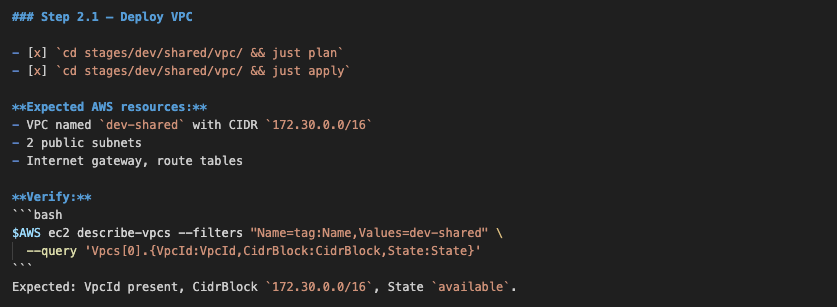
I suspect future LLM versions will automatically generate these verification steps. While some models attempt this now, their instructions are often too vague - for instance, “Ensure the database is running.” This usually leads to bloated execution times, as agents burn tokens trying to figure out how to verify the status, unnecessarily polluting the context window. Worse still, the agent may skip the verification step entirely.
Because of this, we still need to guide agents to generate meaningful verification steps based on our knowledge of what actually proves a task was successfully completed.
Human in the loop
I’m not at the point where I want to leave an agent unsupervised, especially when managing cloud infrastructure. Too many things can go wrong (e.g., dropping a database). Having a good plan is one safeguard; another is checking and approving every command the agent wants to run.
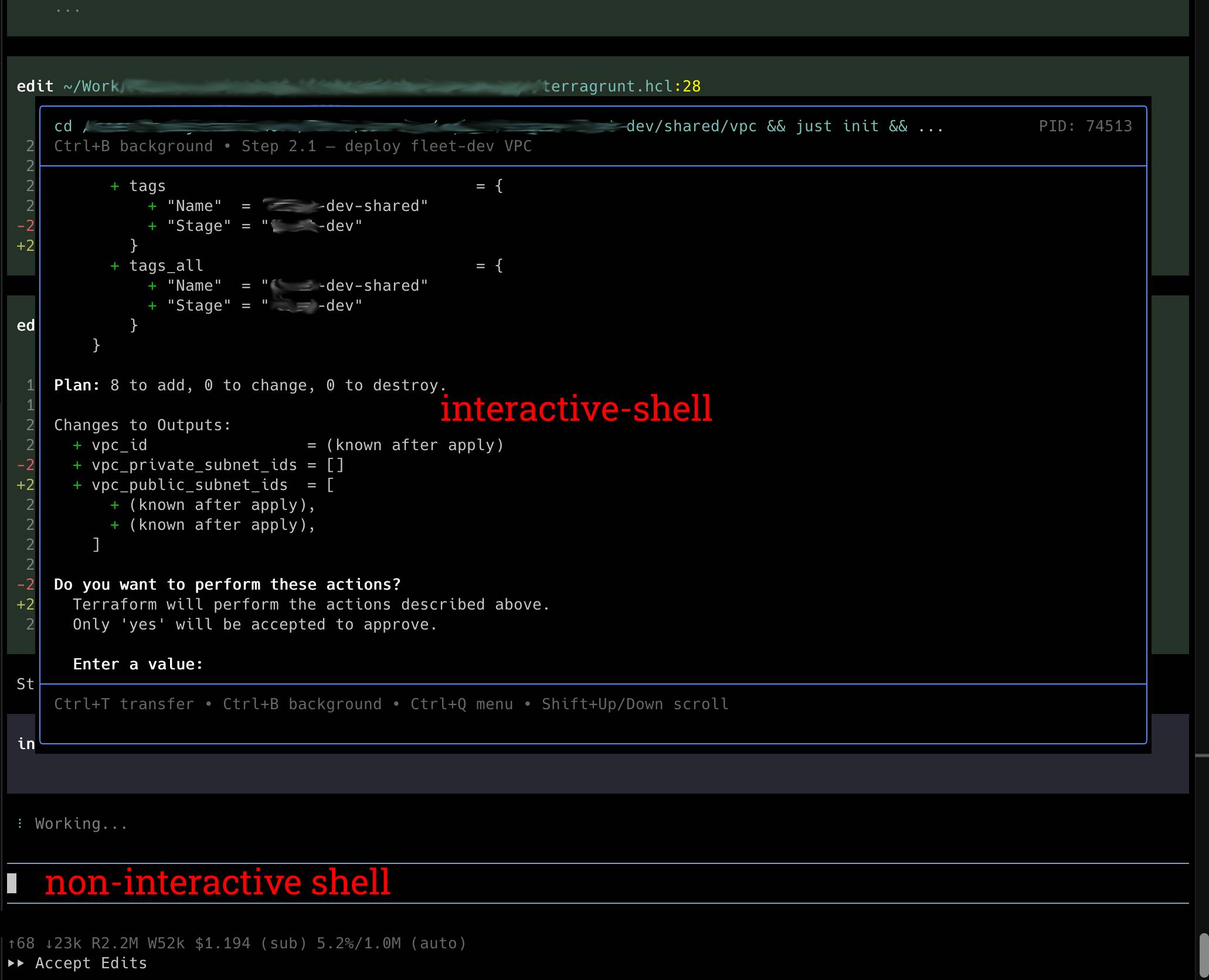
A significant technical hurdle remains: while most of today’s coding agents offer control over command execution, that control fails when a CLI command requires real-time human interaction (e.g., “Enter a value (yes/no)”). In Terraform’s case, an agent might try to bypass this by appending -auto-approve, effectively removing the safety net. To fix this, I extended my agent with an “interactive shell” — a terminal session that accepts real-time input, layered on top of the agent’s non-interactive shell.
I also updated the AGENTS.md file — a conventions file that coding agents read to understand project-specific rules — with these instructions:
This setup results in the agent opening an interactive shell on top of the non-interactive one, executing commands exactly as I would have in the “pre-AI” era. It provides the ideal balance of autonomy and oversight.
Debugging becomes almost automated
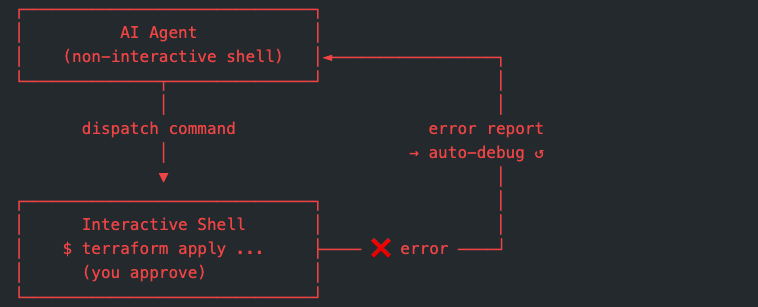
Another benefit of using an interactive shell is error handling. When an error occurs in the interactive shell, the report is passed back to the non-interactive shell, allowing the agent to start debugging without a user prompt. I found major time savings in this feedback loop.
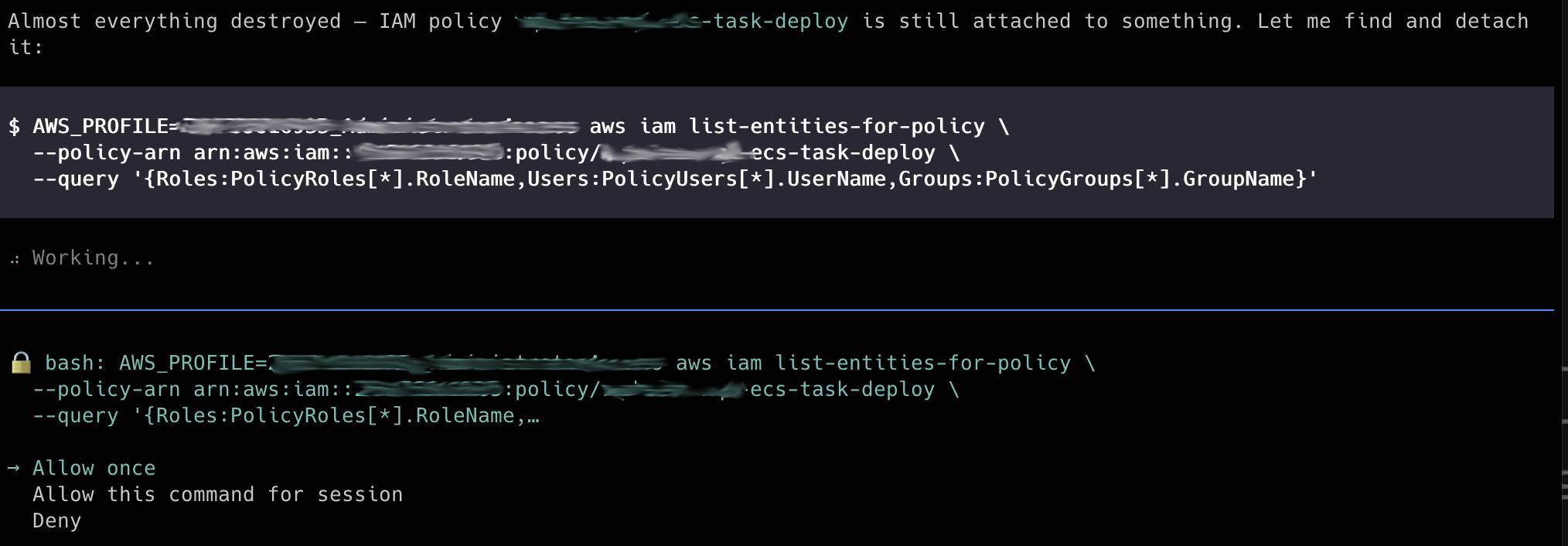
On one occasion, the agent couldn’t entirely destroy a specific AWS resource. Through several debugging loops, it identified the cause and generated the relevant AWS CLI command to unblock the operation. My role was simply to observe the process and approve the commands.
The bottom line
Was it worth letting an agent run the migration? Yes, clearly. The plan helped me to prepare the migration in a structured way, thus reducing stress. The time I would have spent debugging went to reviewing. The commands I would have typed went to approving.
But I want to be honest: this only works if you know what you’re doing. Without a solid foundation in Terraform and AWS, “approving” those commands would be no different than playing Russian roulette.
The agent doesn’t replace your AWS knowledge — it just stops you from doing the boring parts of the job.